 Plugora
Know when your store silently
stops taking or syncing orders.
Uptime monitors only check that your homepage loads. Sentinel watches the parts of WooCommerce that fail quietly, and tells you within minutes.
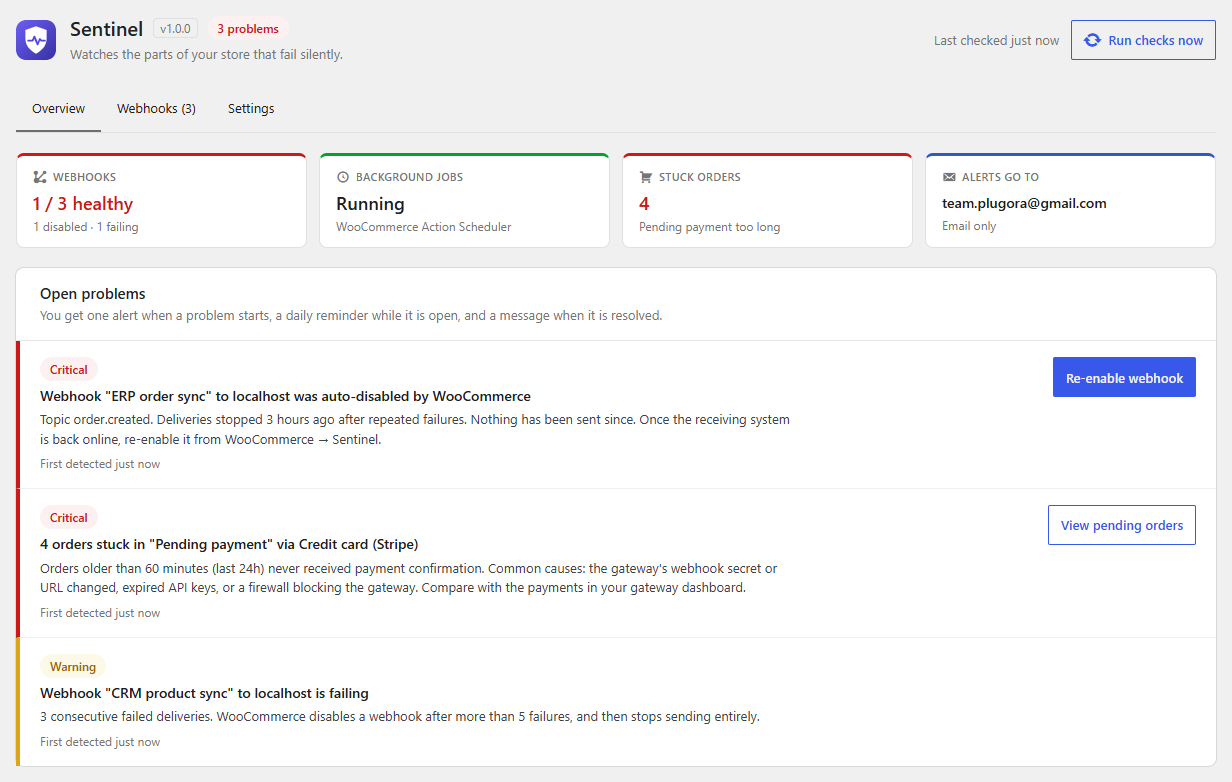
What Sentinel watches
It checks every 15 minutes in the background and emails you once when a problem starts, a daily reminder while it's open, and a message when it's resolved.
Webhooks switched off
After more than 5 failed deliveries, WooCommerce disables a webhook and never retries it. Your ERP, fulfilment or CRM sync simply stops. Sentinel alerts you straight away.
Failing webhooks
A warning while deliveries are failing, before WooCommerce disables the webhook.
Stalled background jobs
Overdue or failed Action Scheduler jobs, which delay emails, syncs and subscription renewals.
Stuck payments
Orders stuck in "Pending payment", grouped by payment method. Usually a sign that confirmations from your gateway aren't arriving.
Free and Pro
Sentinel is free and fully functional. Sentinel Pro is an optional add-on for stores that depend on integrations.
| Feature | Free | Pro |
|---|---|---|
| Disabled and failing webhook alerts | ✓ | ✓ |
| Stalled background job alerts | ✓ | ✓ |
| Stuck payment alerts | ✓ | ✓ |
| Email alerts with reminders and resolution notices | ✓ | ✓ |
| One-click webhook re-enable | ✓ | ✓ |
| Resend every order or product a webhook missed | – | ✓ |
| Slack alerts | – | ✓ |
Sentinel (free) will be available from the WordPress.org plugin directory once it has passed review. Sentinel Pro is coming soon – email support@plugora.in for early access.
Setup guide
Install
- In WordPress, go to Plugins → Add New Plugin, search for Plugora Sentinel, then click Install Now and Activate. WooCommerce must be active.
- Go to WooCommerce → Sentinel. Sentinel runs its first checks within a few minutes; click Run checks now to check immediately.
- Alerts go to your site's admin email. To change it, open the Settings tab and enter one or more addresses, separated by commas.
When a webhook is disabled
WooCommerce disables a webhook after repeated delivery failures, usually because the system receiving it (your ERP, CRM or fulfilment app) was down.
- Make sure the receiving system is back online.
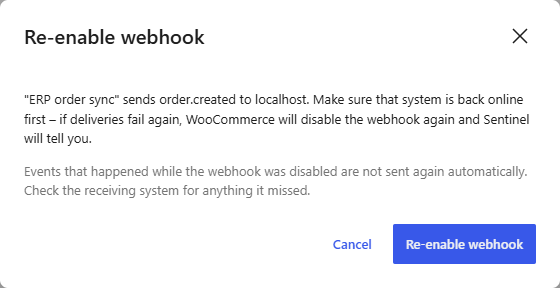
- In WooCommerce → Sentinel, click Re-enable webhook on the problem and confirm.
- New events are delivered again. Events from while it was disabled aren't sent automatically: check the receiving system for anything it missed, or use Sentinel Pro to resend them.
When orders are stuck in Pending payment
The customer went to your payment gateway, but your store never received the confirmation. Compare the orders with the payments in your gateway's dashboard. Common causes:
- the gateway's webhook URL or secret changed
- expired or revoked API keys
- a firewall or security plugin blocking the gateway's callbacks
Bank transfer, cheque and cash on delivery are ignored, since they are normally pending. You can change which payment methods are ignored, and the thresholds, in Settings.
When background jobs are stalled
WooCommerce's background queue (Action Scheduler) runs through WP-Cron. If jobs are overdue, WP-Cron is usually disabled or blocked: ask your host whether a real server cron is set up, and check that a caching or security plugin isn't blocking wp-cron.php.
FAQ
Does it slow down my store? No. It runs in the background and loads nothing on your storefront.
Does it send my data anywhere? No. Apart from the alert emails you configure, nothing leaves your site.
Does it work with HPOS and block checkout? Yes.